Enterprise Hub
I led several naming workstreams, created an account structure taxonomy, and partnered with product design to think through navigation, terminology, and IA for an expanded version of the Airtable admin panel that enabled scaled administration at large organizations.
Problem
Large enterprise customers faced administration challenges. The existing "organization" account structure wasn't robust enough, forcing customers to either create multiple organizations (management burden) or consolidate everything (visibility issues for some admins).
Solution
Enterprise Hub introduced new account structures and administrative control levels, inspired by Slack's Enterprise Grid model. The feature enables:
- Scalable administration for large organizations
- Delegation of responsibilities to line-of-business owners
- Standardized settings enforcement
- Uniform security policies
My key contributions
Product naming
When I joined the project, the working name for the feature was "Enterprise Grid," as we were modeling it after Slack's offering. However, this was creating a lot of confusion on the team because folks were using "grid" to refer to both the new account structure we were introducing and the overall feature name (i.e. "With Enterprise Grid, you'll be able to have a grid that contains multiple organizations.").
Because "grid" is not an intuitive term, I assembled a thorough competitive audit, led namestorms with key stakeholders, and ran UserZoom validation studies. After presenting proposals to product leadership, we landed on:
- Organizational units as the new account structure
- Enterprise Hub as the feature name, to emphasize the centralization value prop
This preserved 2 out of the 3 of our existing account structure terms while aligning with competitors.
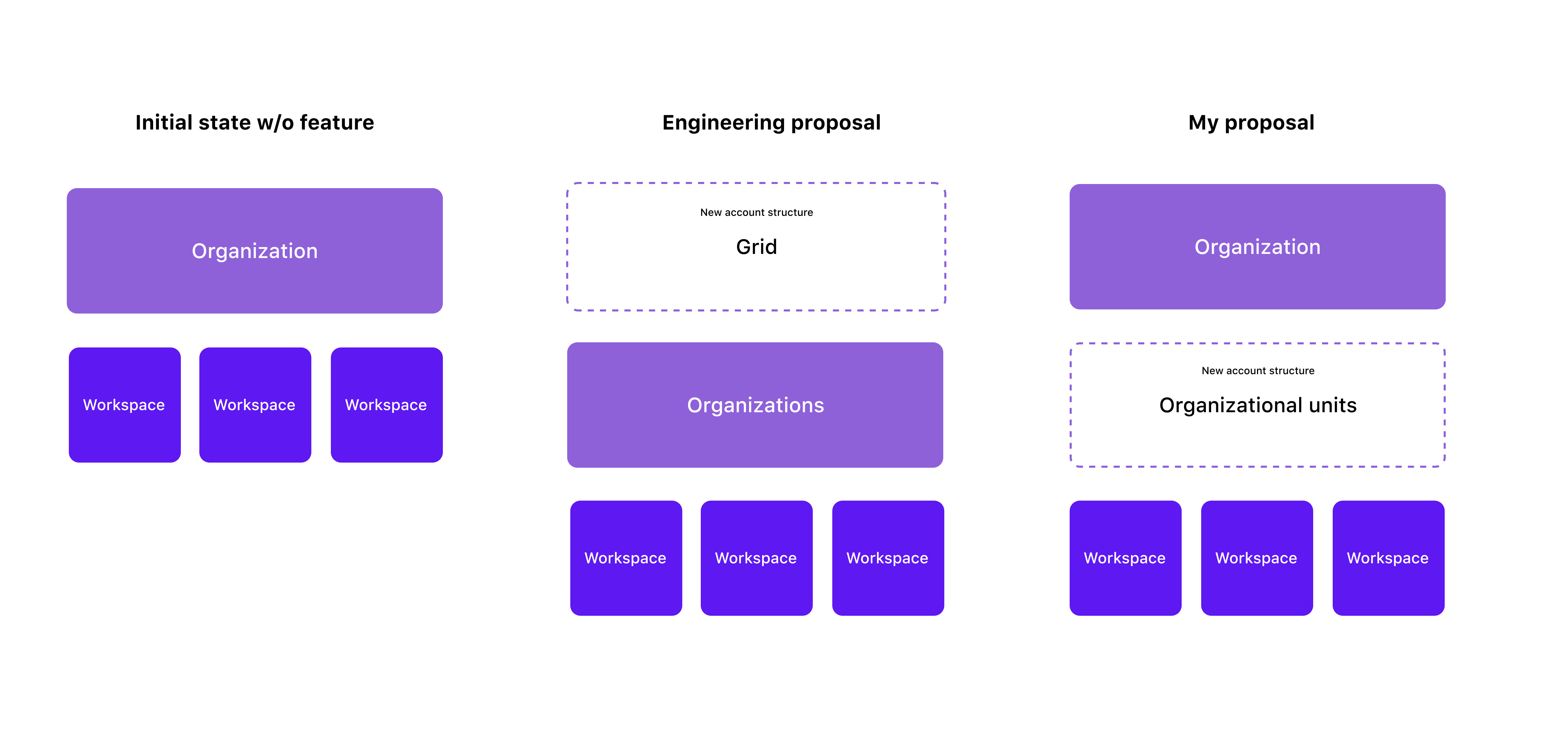
Most competitors used the term "workspace" as the second layer of the account structure, but it would've been too much change management for us to mirror that because of the existing meaning that "workspace" had in Airtable (it's the primary billing unit for self-serve paid plans). I also pushed to keep "organization" as the top layer account structure so it wouldn't have a plan-dependent definition—customers would "unlock" an additional account structure that sat below an "organization" instead of having the definition of "organization" change.
Expanded admin panel
I partnered with Product Design to introduce contextual info display based on an admin's scope (super admin at organization level or org unit admin). This included:
- Net-new Organization page for super admins (central IT users who needed full visibility)
- Nav redesign to support the introduction of org units
- Clear and guided user administration flows
Key content considerations
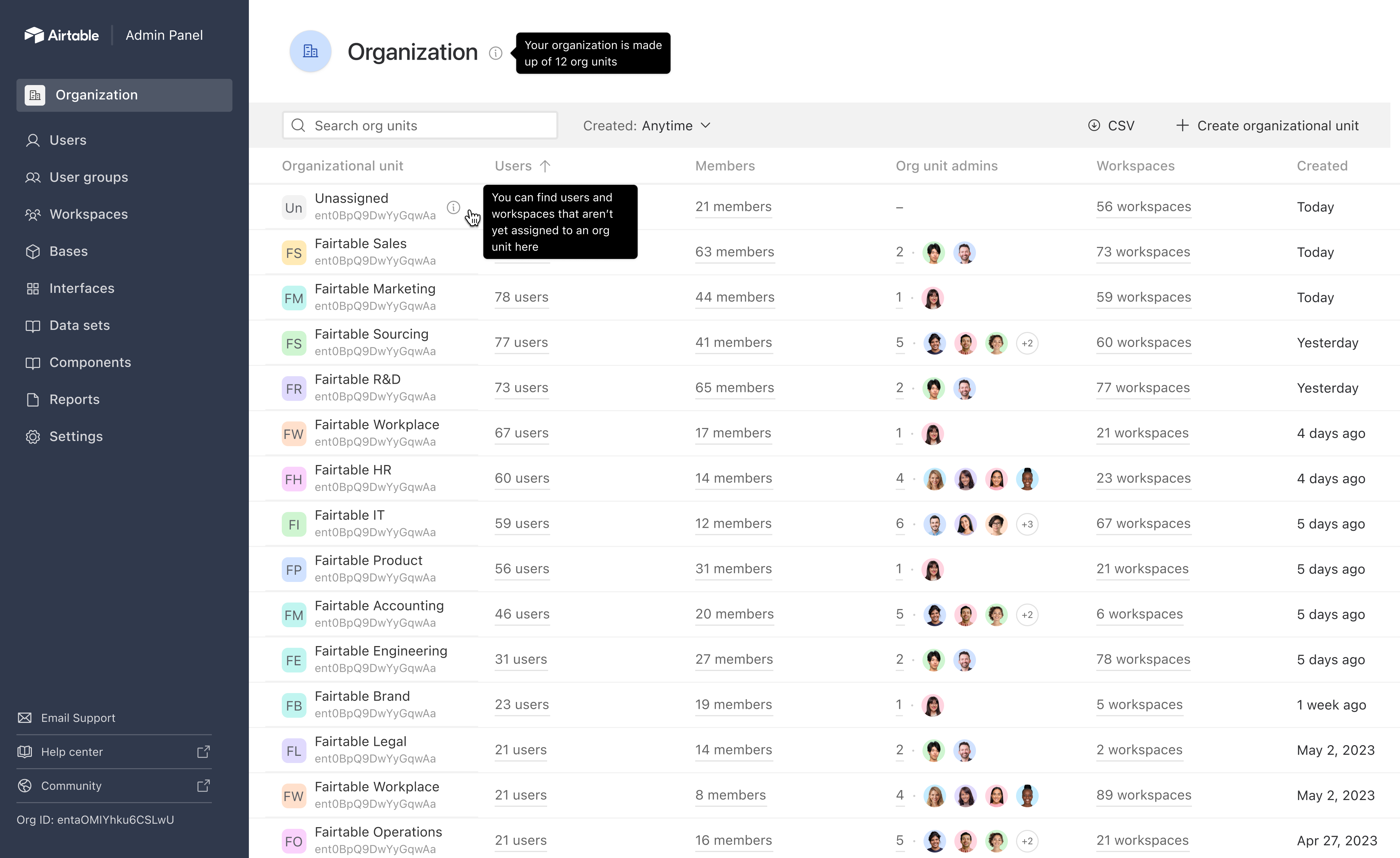
Screen title: Add caption for this screen.
Settings redesign
I partnered with Product Design to redesign admin panel settings to support centrally-configured global settings and inherited defaults for org units. This included:
- New settings nav paradigm to add settings detail pages
- New settings tab IA and setting descriptions to scrub inconsistent and opaque terminology
- New SME review process for future settings updates
Key content considerations

Screen title: Add caption for this screen.
Outcomes
Note that I don't have a lot of specific metrics from this launch, as we started to roll it out to customers late Aug 2023 and I was laid off mid-Sept 2023.